
How can I use ClassLink with Mote?
This article covers all aspects of using ClassLink with Mote.
I'm a Mote user - how do I log in with ClassLink?
Anyone who has a ClassLink account can now use ClassLink to log in to Mote, as shown below.

Are there any downsides to using Sign in with ClassLink?
One limitation to note is that Mote's integration with Google Slides requires Sign In with Google, at least once, in order to grant the relevant permissions. However once the permissions have been granted, users can continue to use ClassLink for regular login.
I'm a Mote Customer with Admin privileges - what do I need to do to use ClassLink login?
You don't need to do anything to enable your students and colleagues to use ClassLink to login to Mote.
I'm a Mote Customer with Admin privileges - can I now use ClassLink instead of Domain Enablement or CSV to authenticate / assign seats?
If you have a District-wide Mote license, you can now use ClassLink to ensure that all of your students and teachers have a Mote license assigned. As new students and teachers join your district, we will automatically re-assign licenses so that you will not exceed your district total.
Similarly, email domain enablement can be used to provide access to all of your users, and to ensure that new users will always be allocated a license. See Table 1 below for details of eligibility.
Table 1: Authentication Options for Mote Customers
| Mote Account Type | Seat allocation options | Notes |
| District license |
ClassLink Email domain enablement CSV upload |
ClassLink and Email Domain enablement both offer auto-allocation of licenses. |
| School license (school is of a district or LEA) |
Email address CSV upload |
Assumes that school shares email domain / ClassLink implementation with schools that do not have Mote licenses |
| School license (school is not part of a district or LEA) |
ClassLink Email domain enablement CSV upload |
Schools that have their own email domain / ClassLink implementation |
| Group / department license |
Email address CSV upload |
|
If your Mote account covers just a school (e.g. and there are other schools in your district who use the same ClassLink Tenant ID), and you wish to use Classlink for authentication, please speak to our team to understand your options.
My district wants to use ClassLink for Mote authentication - what should I do?
If your account is eligible for ClassLink authentication, the process for enablement is very simple:
- Inform your Partnerships or Customer Success Manager that you would like to use ClassLink for authentication. If you are unsure who to contact, please email support@mote.com for help.
- Within 1-2 business days, we will enable your access using ClassLink, and you will be sent notification.
- You will then visit https://www.mote.com/my-school/manage-users/ and may see something like the image below:
-
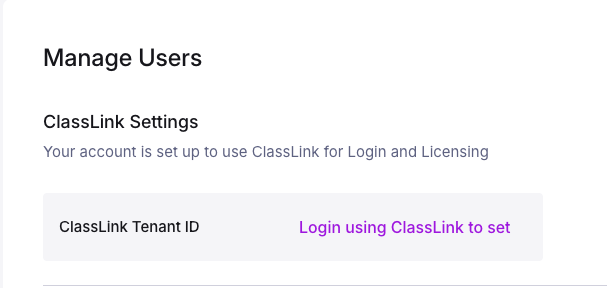
Clicking on the 'Login using ClassLink to set' will log you out of Mote, after which you should log in using ClassLink, and return to this page, at which point your ClassLink Tenant ID will be populated, and anyone who signs in to Mote from your organization, using ClassLink, will automatically be assigned a seat.
- Add Mote to your Student Launchpad Screens by searching for 'Mote' in the Classlink Launchpad, so that all students can login from there.