
Can I disable student access to Mote?
Yes, and Mote gives you several levels of control, from a single feature for one student up to removing Mote entirely. It is worth being clear on what you are trying to achieve, because there is a different control for each.
If your concern is privacy
Mote is FERPA and COPPA compliant, GDPR compliant, a certified participant in the EU-U.S. Data Privacy Framework, and has been a signatory of the Student Privacy Pledge since 2020.
Three commitments in plain terms: Mote never sells your data, never advertises in Mote, and does not own the content you add to Mote.
Mote does not use student-generated content or interactions to train or evaluate AI models. Mote's revenue comes from subscriptions, not from data monetization or advertising. The AI in Mote is bounded to specific assistive tasks: Read Aloud, Speech to Text, Translation, Text Prediction, Mote Writing Review, and the picture dictionary's image generation. None of it produces open-ended generated text from student work.
Student content is deleted automatically on the one-year anniversary of its creation, even on active accounts.
Turning features on or off for a student or a class
- Go to mote.com/my-classes and open the class.
- Click the Members tab, then Manage next to the student.
- Toggle individual features on or off.
- To apply the same settings to everyone, click "Apply these settings to all members in the class" and confirm.
These controls apply to users who signed up as students, not to co-teachers or other adults in the class. Students need Mote Unlimited for full access to features.
Setting a feature across the whole school or district
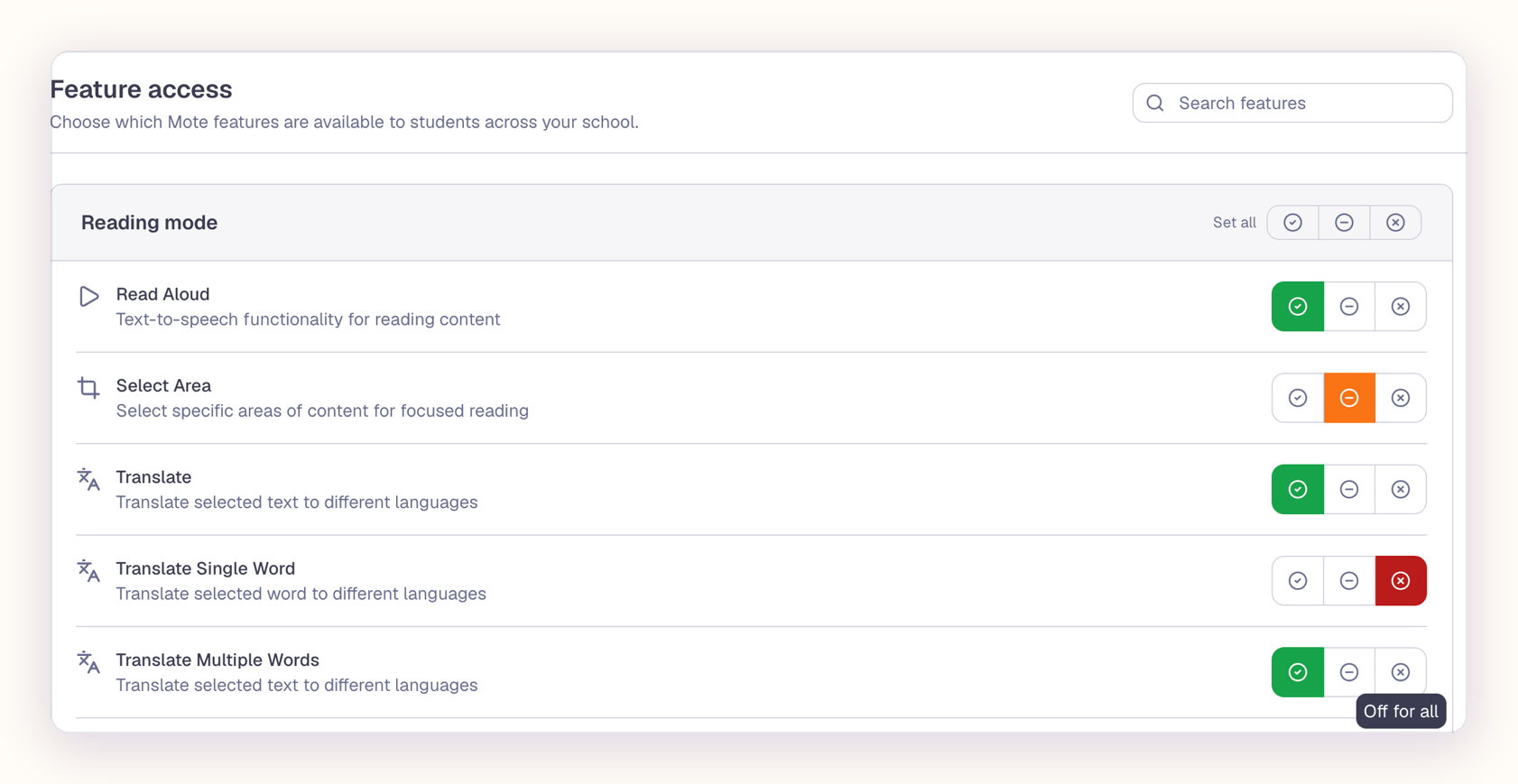
Account owners and administrators can set Feature Access from the My School dashboard, which applies to every student in the organization rather than class by class. Each feature has three states: On, available to every student; Off for all, unavailable to every student; and Off by default, where the decision stays with the teacher. When a feature is unavailable, students are told why, and teachers can see which administrator set it.
Pausing the tools during a test
Assessment Mode pauses the features you choose for a set length of time: 30 minutes, 1 hour, 2 hours, 4 hours, or until the end of the school day. You can exclude individual students, so anyone whose IEP requires Mote keeps it, and you can end it early at any point.
Removing Mote entirely
If you do need Mote gone rather than adjusted, your IT department controls whether the Mote Chrome Extension is allowed on managed devices. That removes every part of the experience, including the reading and writing support some students depend on, so it is worth checking whether the controls above already cover what you need.
Why would you want to disable student access to Mote?
If your concern is privacy, or how student data is handled, that is answered in full at mote.com/privacy.